The three root causes
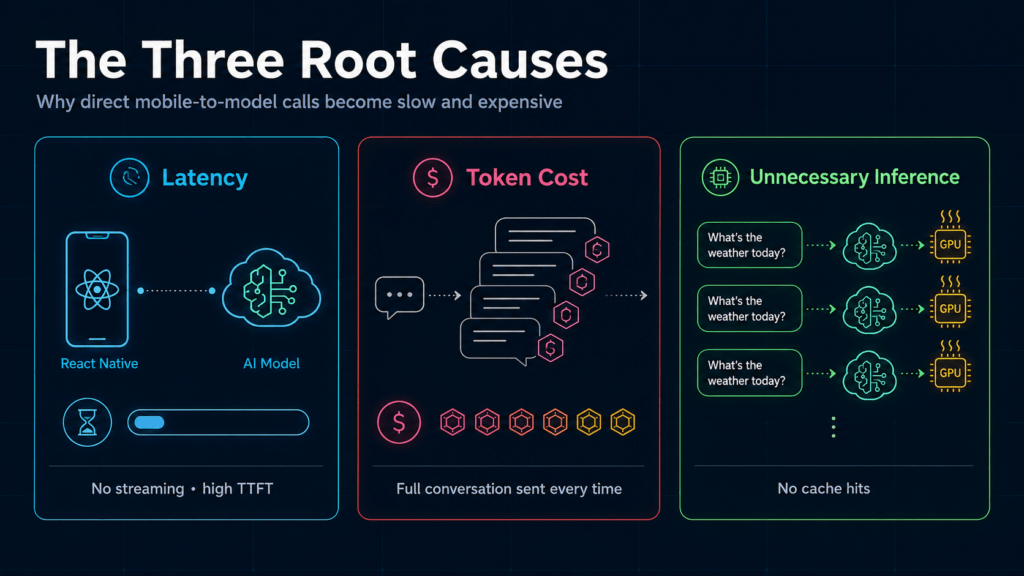
When you call a large language model directly from a React Native app — no orchestration, no streaming, no cache — three things happen simultaneously: the UI freezes waiting for a complete response, your token bill grows with every message in the conversation history, and you’re running inference you could have avoided.
This article walks through an orchestration layer built on AWS AppSync + Lambda + Bedrock that addresses each of these at the infrastructure level, not at the product level.
- Latency: A direct InvokeModel call from a React Native client adds several seconds of TTFT (time-to-first-token). Without streaming, the UI blocks until the full response is ready.
- Token cost: Every round-trip carries the full conversation history. Without a caching or context-trimming layer, token usage grows linearly with conversation length.
- Unnecessary inference: Duplicate questions with no cache hits translate directly to wasted GPU-hours and increased carbon footprint.
Prerequisites
— AWS CLI configured
— Bedrock model access enabled
— Amplify CLI installed
— React Native and Node.js installed
The orchestration layer: what it solves
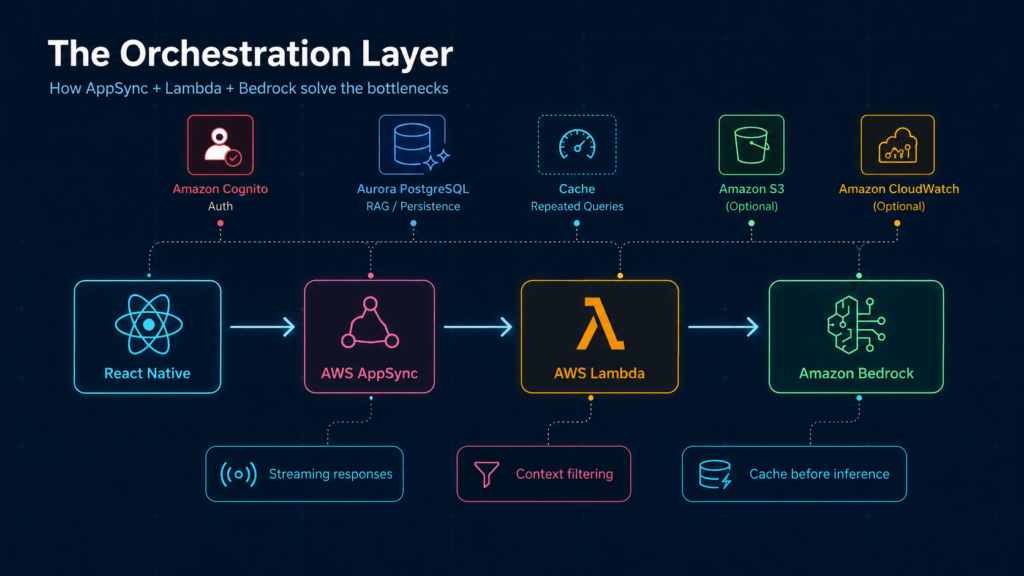
This is not a React Native performance problem. It’s an architecture problem. The orchestration layer solves each root cause at the infrastructure level:
- Latency: Token streaming via AppSync subscriptions delivers the first characters to the UI in under a second, without waiting for the full response.
- Token cost: Edge filtering in Lambda strips irrelevant context before it reaches Bedrock — only the relevant payload is sent.
- Unnecessary inference: A cache layer in Lambda intercepts repeated queries before they hit the model.
- Data privacy: Bedrock runs inside your AWS account via VPC — your data never leaves to train public models.
Each layer has a single responsibility. Here’s the stack:
- React Native (Frontend): Our single interface for iOS, Android and web.
- Amazon Cognito (Identity): Assigns IAM roles that restrict which principals can invoke Bedrock endpoints.
- AWS AppSync (GraphQL): GraphQL lets the client request only the fields it needs, reducing payload size and mobile bandwidth consumption.
- AWS Lambda (Logic): Functions that execute only when needed, executing context filtering and cache checks before invoking Bedrock
- Amazon Bedrock (AI): AWS’s managed service giving us access to models such as Claude or Llama via a private, secure API.
- Amazon RDS / Aurora PostgreSQL: For persistence of complex relational data that the AI needs to query (RAG — Retrieval Augmented Generation).
Environment setup
All infrastructure is defined as code. No manual steps in the AWS Console.
During amplify init, configure two separate environments: dev and prod. Never test prompts or model calls against the production environment.
# Install the Amplify CLI to manage the backend
npm install -g @aws-amplify/cli

# Initialise the React Native project with TypeScript
npx react-native init GreenAIApp --template react-native-template-typescript

# Initialise the AWS environment
amplify init
Implementation
Secure Authentication (Cognito)
Cognito handles authentication and assigns IAM roles per user. This is what restricts which principals can invoke Bedrock endpoints.
amplify add authIn the React Native code, we wrap our app:
import { withAuthenticator } from 'aws-amplify-react-native';

const App = () => {
  return (
    <SafeAreaView>
      <Text>AI Assistant v1.0 - Secure Access</Text>
    </SafeAreaView>
  );
};

export default withAuthenticator(App);
Lambda handler: cache check + Bedrock invocation
The Lambda function runs two steps before invoking Bedrock: a cache lookup and a RAG query against PostgreSQL. If the cache hits, Bedrock is never called.
Example Lambda logic (Node.js):
const { BedrockRuntimeClient, InvokeModelWithResponseStreamCommand } = require("@aws-sdk/client-bedrock-runtime");
const { Client } = require('pg');

exports.handler = async (event) => {
  const pg = new Client({ /* RDS credentials via Secrets Manager */ });
  await pg.connect();

  // 1. Cache check — skip Bedrock if already answered
  const cached = await pg.query(
    'SELECT response FROM cache WHERE question_hash = $1',
    [event.questionHash]
  );
  if (cached.rows.length > 0) {
    await pg.end();
    return { source: 'cache', response: cached.rows[0].response };
  }

  // 2. RAG — fetch relevant context from knowledge base
  const context = await pg.query(
    'SELECT content FROM knowledge_base WHERE topic = $1 LIMIT 3',
    [event.topic]
  );
  await pg.end();

  // 3. Invoke Bedrock with Messages API
  const bedrock = new BedrockRuntimeClient({ region: "us-east-1" });
  const command = new InvokeModelWithResponseStreamCommand({
    modelId: "anthropic.claude-3-haiku-20240307-v1:0",
    contentType: "application/json",
    accept: "application/json",
    body: JSON.stringify({
      anthropic_version: "bedrock-2023-05-31",
      max_tokens: 300,
      messages: [{
        role: "user",
        content: `Context: ${context.rows.map(r => r.content).join('\n')}\n\nQuestion: ${event.question}`
      }]
    })
  });

  const stream = await bedrock.send(command);
  return { source: 'bedrock', stream };
};
File uploads to S3 for vision analysis
Files uploaded for vision analysis are stored in S3 with private ACL — accessible only by the authenticated user’s IAM role, never publicly exposed.
// Amplify v6: use storage from 'aws-amplify/storage' instead
import { Storage } from 'aws-amplify';

const uploadDocument = async (fileUri: string) => {
  try {
    const response = await fetch(fileUri);
    const blob = await response.blob();
    await Storage.put(`uploads/${Date.now()}.jpg`, blob, {
      level: 'private',
      contentType: 'image/jpeg',
    });
  } catch (error) {
    console.error("S3 upload error:", error);
  }
};
Best Practices
Payload minimisation with GraphQL
With GraphQL via AppSync, the client requests only the fields it needs. For a long Bedrock response, requesting only the summary field instead of the full object reduces payload size significantly — relevant on mobile connections.
Model selection: match model size to the task
Reserve large models for complex reasoning. For classification, intent detection, or short summaries, smaller models available in Bedrock are substantially cheaper and faster. Match the model to the task, not to the marketing.
Client-side caching
Use React Query or Apollo cache in React Native to store responses locally. If the same question is asked twice, serve it from cache — no Lambda invocation, no Bedrock call.
Deployment and CI/CD
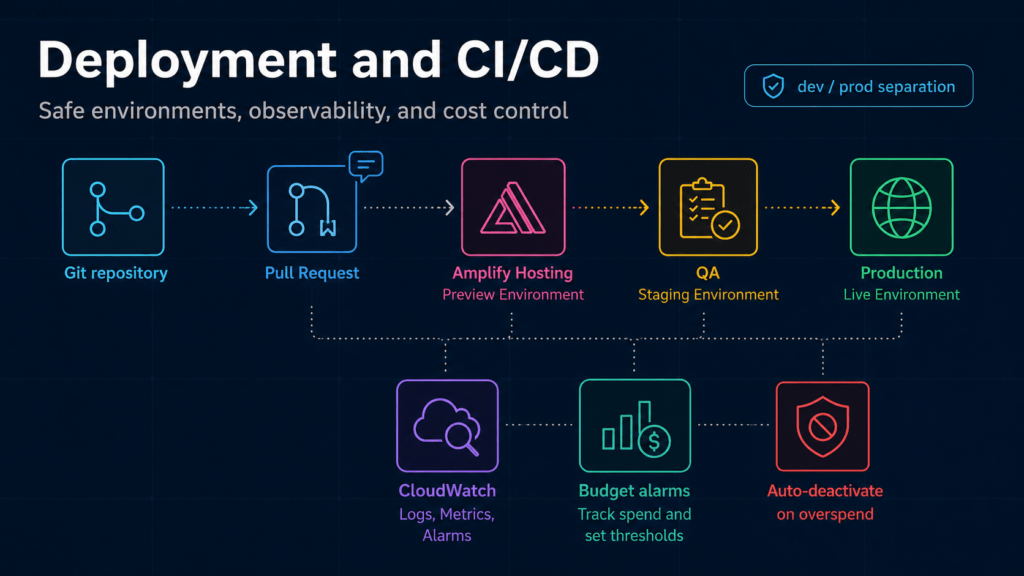
- Amplify Hosting: Connect your GitHub repository. Each Pull Request will generate an ephemeral backend environment for the QA team to test AI features without breaking production.
- Monitoring with CloudWatch: Configure budget alarms. If Bedrock API consumption exceeds $50 in a day, the Lambda function should automatically deactivate to prevent runaway costs.
Trade-offs
| Feature | React Native + AWS Stack | Alternative (Firebase/Heroku) |
|---|---|---|
| AI Model Control | Full control (private models via Bedrock) | Limited (dependency on external APIs) |
| Sustainability | Fewer wasted inference calls via cache + model selection | Medium |
| Learning Curve | High (requires IAM and VPC knowledge) | Low |
| Cost at Scale | Very low (true pay-per-use) | Can become unpredictable |
Conclusion
The latency and cost problems described here are not product problems — they’re architecture problems. The orchestration layer built with AppSync, Lambda and Bedrock solves each one at the infrastructure level.
If you’re starting to explore this stack, a practical first step is to deploy a single Lambda function that calls Bedrock, measure the response time, and compare it against a direct API call. The difference will make the case better than any diagram.
The goal is not to build an app that works — it’s to build one that’s fast, cheap to maintain, and responsible by design.