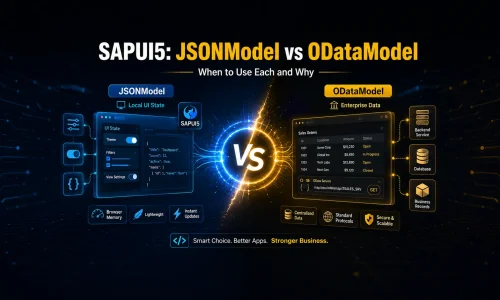
A practical guide to choosing the right model for UI state and business data.
When you start working with SAPUI5, JSONModel can feel like the easiest answer for almost every screen. You can create a JavaScript object, bind it to the view, update a property and immediately see the UI react. That simplicity is useful, but it can also lead to a common architectural mistake: treating business data from an OData service as if it were just another local JSON object.
JSONModel and ODataModel use similar binding concepts, but they solve different problems. The important question is not which model has the simpler syntax. The important question is who owns the data and where operations such as filtering, paging and persistence should happen.
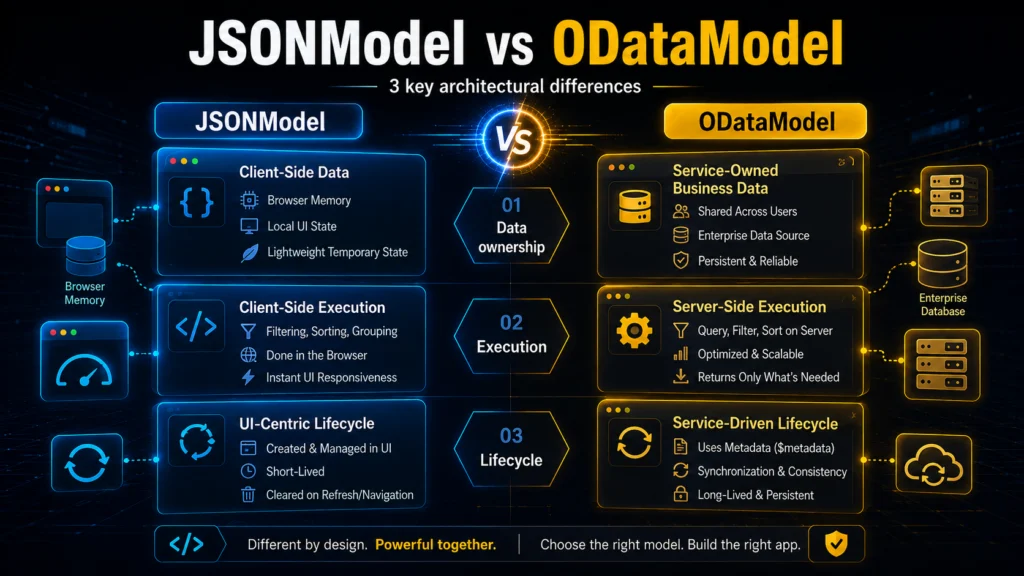
The three architectural differences
There are three differences worth remembering:
- Data ownership: JSONModel contains client-side data, while ODataModel represents entities managed by an OData service.
- Execution: JSONModel works mainly in browser memory, while ODataModel can delegate queries and data changes to the backend.
- Lifecycle: JSONModel is ideal for temporary UI state, while ODataModel is designed around remote business data, service metadata and synchronization.
A useful rule is simple: if the data exists because of the UI, think JSONModel. If the data exists independently of the UI and belongs to the business domain, think ODataModel.
JSONModel: data controlled by the frontend
JSONModel is a great fit for values such as busy indicators, edit mode, selected tabs, local filters or temporary form state. The whole structure lives in the browser and is completely controlled by the frontend.
const oViewModel = new JSONModel({
  busy: false,
  editMode: false,
  selectedCategory: "All"
});

this.getView().setModel(oViewModel, "view");
Why JSONModel works well for local state
It is lightweight, easy to understand and works naturally with named models such as “view” or “state”. There is no reason to send a request to the backend when a user opens a panel or changes the selected tab. Local state should normally stay local.
The limitation appears when the dataset becomes large or must stay synchronized with a backend. A JSONModel does not automatically understand OData metadata, server-side paging or remote CRUD semantics.
ODataModel: the backend is the source of truth
ODataModel is the natural choice when the screen works with business entities such as Products, Orders or Customers exposed by an OData service. Instead of copying those entities into an independent local structure, SAPUI5 can bind controls directly to the service model.
This keeps the backend as the source of truth. The model understands service metadata and can coordinate reads and data changes without forcing the application to build a second copy of the same business state.
<Table items="{
  path: '/Products',
  parameters: {
    $select: 'ID,Name,Price'
  }
}">
Server-side filtering is the architectural difference
The biggest practical difference becomes visible with larger datasets. Imagine a service with 50,000 products. Loading everything into a JSONModel and then filtering in JavaScript means transferring and storing data the user may never need.
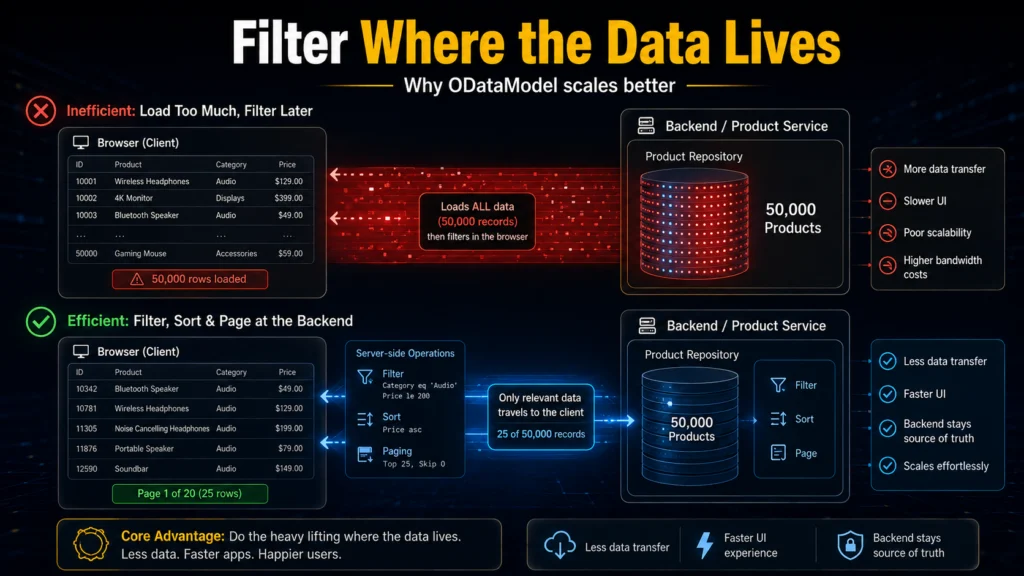
With ODataModel, filters, sorting and paging can be translated into OData requests so that the backend returns only the relevant records. This is more than a performance trick. It keeps data processing in the layer that owns the data and makes the frontend easier to maintain.
The best real-world pattern: use both models
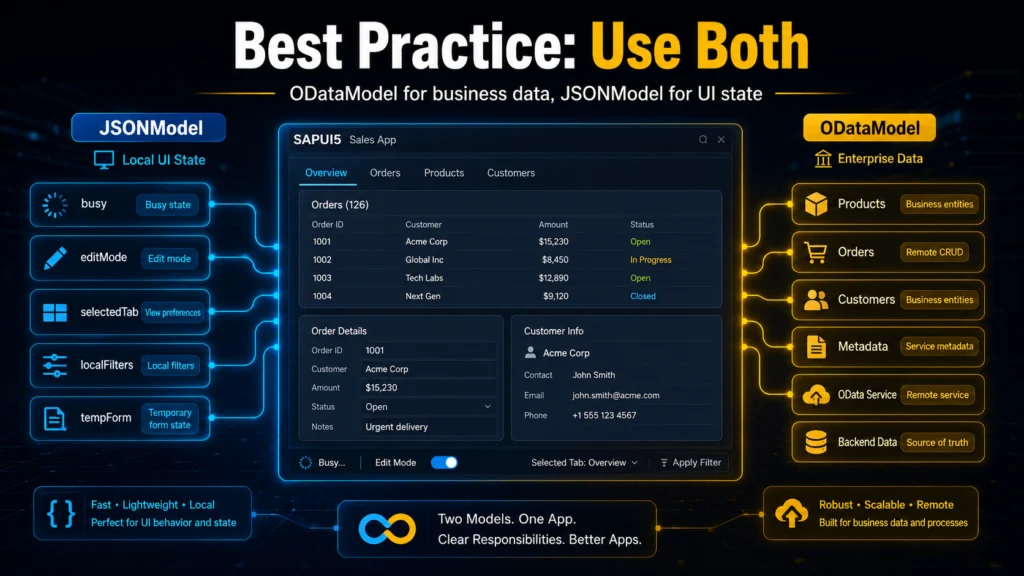
In a real SAPUI5 application, the answer is usually not JSONModel or ODataModel. It is both, with clear responsibilities. Use ODataModel for business entities and JSONModel for UI state.
For example, a Products page can bind its table to /Products from the default ODataModel while a named model called “view” stores busy, editMode and selectedCategory. The XML view can consume both models at the same time. This separation makes it immediately clear which state belongs to the backend and which state belongs only to the screen.
The anti-pattern: copying OData into JSONModel
A common pattern is to read /Products from OData, copy the result into a new JSONModel and bind the table to that copy. It works, but it often removes the reason for using ODataModel in the first place.
Once the data is duplicated, you must decide which copy is current, refresh it after updates and manually reproduce behaviors that ODataModel already provides. There are valid exceptions, for example when data must be heavily transformed into a temporary client-only structure. But copying should be a deliberate decision, not the default architecture.
// Avoid this as a default pattern
oModel.read("/Products", {
  success: ({ results }) => {
    this.getView().setModel(new JSONModel(results), "products");
  }
});
Binding paths look similar – behavior does not
A JSONModel binding such as {view>/editMode} and an ODataModel binding such as {/Products} both look like paths in XML. That visual similarity can hide a major difference. A JSON path points to data already held by the client. An OData path can represent a remote entity set whose data is loaded, filtered or refreshed through the service.
When reviewing a SAPUI5 screen, do not judge the model only by the binding syntax. Follow the path back to its owner.
Best practices
Use named JSONModels for UI-specific state such as “view”, “state” or “filters”. Keep the main ODataModel focused on business data. Avoid loading large remote collections into JSON just to make binding feel simpler. Use server-side filtering, sorting, paging and $select when the service supports them. Finally, keep model responsibilities obvious enough that another developer can understand the screen without tracing every controller method.
Advantages and disadvantages
| Area | Summary |
|---|---|
| JSONModel advantages | Simple local state, lightweight setup, easy JavaScript structure, ideal for temporary UI values. |
| JSONModel disadvantages | Client memory only, no native remote persistence, not ideal for large server datasets. |
| ODataModel advantages | Native OData binding, backend queries, metadata, paging and remote data operations. |
| ODataModel disadvantages | More service concepts to understand and unnecessary for simple local UI state. |
Conclusion
JSONModel and ODataModel are not competing solutions. They are complementary tools for different layers of state. JSONModel is excellent when the frontend owns the data and needs fast, temporary state. ODataModel is the better fit when the data belongs to a backend service and must be queried, changed or synchronized as business data.
The most maintainable SAPUI5 applications usually combine both: local UI state stays in a small JSONModel, while business entities remain connected to ODataModel. Once that ownership is clear, model selection becomes much easier and the application architecture becomes easier to reason about.