Authentication is a fundamental aspect of consuming APIs, ensuring that only authorized users or systems can access protected resources. There are several types of authentications for APIs, each with its advantages and disadvantages. In this article, we will explore the most commonly used methods and when to use them.
1. API Key Authentication
API keys are the simplest form of authentication. They rely on a unique string of characters that must be included in every API request.
Why are API Keys important?
API keys are essential for basic project management:
- Access Control: They allow you to control who can access the API, ensuring that only authorized applications can make requests.
- Usage Monitoring: They help track how the API is used, which is crucial for detecting abuse or malicious use.
- Project Identification: Facilitates the identification of specific projects, allowing requests to be associated with a particular project.
Authentication and Authorization
API keys are used to:
- User Authentication: Verifies the identity of the user making the request.
- Project Authorization: Ensures that the application calling the API has permissions to do so and access resources.
When to use API Keys
API keys are useful in a variety of situations, such as:
- Block Anonymous Traffic: Help identify potentially malicious traffic.
- Control the Number of Calls: They allow you to limit the use of the API and ensure that only legitimate traffic accesses it.
- Identify Usage Patterns: Facilitate the detection of suspicious activity.
Limitations of API Keys
It’s important to note that API keys are not foolproof. They should not be used for:
- Secure Authorization: Not as secure as authentication tokens.
- Identify Project Creators: They can’t identify who created a project.
- Identify Individual Users: These are used to identify projects, not the users who access them.
How it Works:
The key is sent in the HTTP headers, in the URL, as a query parameter or as Cookie.
As query parameter:
GET /data?api_key=YOUR_KEY HTTP/1.1Also as header:
GET /data HTTP/1.1
X-API-Key: abcdef12345
As Coookie:
GET /data HTTP/1.1
Cookie: X-API-KEY=abcdef12345
Advantages:
- Easy to implement.
- Useful for basic authentication.
Disadvantages:
- Less secure if the key is exposed or leaked.
- Does not allow granular access control.
2. Basic Authentication
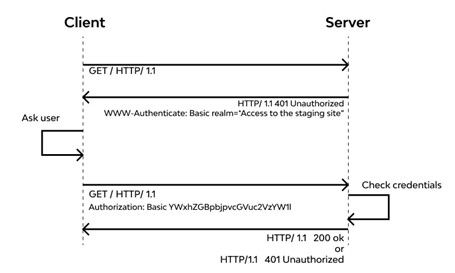
Basic authentication uses a Base64-encoded username and password that must be included in each API request.
Why is Basic Authentication important?
Basic authentication is essential for several reasons:
- Simplicity: It is easy to implement and understand.
- Compatibility: Works with most web servers and client libraries.
- Transparent: Requires no additional steps for authorization after the first authentication.
Authentication and Authorization
Basic authentication is used to:
- User Authentication: Verifies the identity of the user making the request.
- Access Authorization: Ensures that the user has permissions to access the requested resources.
When to use Basic Authentication
Basic authentication is useful in a variety of situations, such as:
- Simple Applications: Ideal for applications with few users and where security is not critical.
- Controlled Environments: Useful in internal networks where traffic security can be guaranteed.
- Rapid Testing: Suitable for prototypes and rapid testing of APIs.
Limitations of Basic Authentication
It’s important to note that basic authentication isn’t foolproof. It should not be used for:
- Sensitive Transactions: Not secure for transactions that require high confidentiality.
- Granular Access: Does not allow for more granular role-based access control.
- Insecure environments: It should not be used without HTTPS, as credentials can be easily intercepted.
How it Works:
Credentials are sent in the authorization header of the request.
GET /resource HTTP/1.1
Authorization: Basic dXNlcm5hbWU6cGFzc3dvcmQ=
Warning: You must always use HTTPS with Basic Auth. Since Base64 is easily decoded, using HTTP exposes your passwords in plain text.
Advantages:
- Easy to implement.
- Works well for simple authentications.
Disadvantages:
- Less secure if credentials are exposed or leaked.
- It does not allow granular access control.
3. OAuth 2.0 (Delegated Authorization)
OAuth 2.0 is a widely used standard that allows users to authenticate without sharing their credentials directly.
How it works:
- An access token is obtained through an authorization server.
- This token is sent in each API request.
Example request to obtain a token:
POST /token HTTP/1.1
Content-Type: application/x-www-form-urlencoded

grant_type=client_credentials&client_id=YOUR_ID&client_secret=YOUR_SECRET
Example usage of the token:
GET /protected-resource HTTP/1.1
Authorization: Bearer ACCESS_TOKEN
Advantages:
- More secure than an API key.
- Allows delegated access and permission granularity.
Disadvantages:
- More complex to implement.
- Requires additional infrastructure.
4. JWT (JSON Web Token) Authentication
JSON Web Token (JWT) is a JSON-based token format that contains encrypted and authenticated information.
Why is JWT popular?
JWT is essential for several reasons:
- Security: Provides a secure method of transmitting information between parties.
- Stateless: Allows the server to not need to store session information, which improves scalability.
- Interoperability: It can be used on different platforms and programming languages.
Authentication and Authorization
JWT is used to:
- User Authentication: Verifies the identity of the user making the request.
- Access Authorization: Ensures that the user has permissions to access the requested resources.
When to use JWT
JWT is useful in various situations, such as:
- Web and Mobile Apps: Ideal for apps that require authentication across multiple devices.
- Microservices: Suitable for microservices architectures where a lightweight authentication method is required.
- RESTful API: Commonly used in RESTful APIs to keep authentication stateless.
Limitations of JWT
It’s important to note that JWT isn’t foolproof. It should not be used for:
- Storage of Sensitive Information: Sensitive information should not be included in the token payload.
- Token Revocation: It does not allow you to easily revoke tokens before their expiration.
- Token Management: Requires proper management of token expiration and renewal.
How does JWT Works:
- The token is generated when the user is authenticated and sent in the authorization header of the request.
- A JWT token consists of three parts: header, payload, and signature.
- It is sent in each API request.
Example request with JWT:
GET /resource HTTP/1.1
Authorization: Bearer JWT_TOKEN
Advantages:
- More secure and flexible than API keys.
- Does not require server-side storage (stateless).
Disadvantages:
- If a token is leaked, it can be used until it expires.
- Validation can be complex.
5. Digest Authentication
Similar to Basic Authentication, but uses a cryptographic hash instead of sending credentials in plain text.
Example:
GET /resource HTTP/1.1
Authorization: Digest username="admin", realm="API", nonce="xyz", uri="/resource", response="encrypted"
Advantages
- More secure than Basic Auth.
- Does not expose plain text passwords.
Disadvantages:
- More complex to implement.
- Can be slow.
6. Mutual TLS (mTLS)
Mutual TLS (mTLS) uses SSL/TLS certificates to authenticate both the client and the server.
Advantages:
- Maximum security.
- Protects against MITM (Man-in-the-Middle) attacks.
Disadvantages:
- Requires certificate infrastructure.
- Not easy to implement.
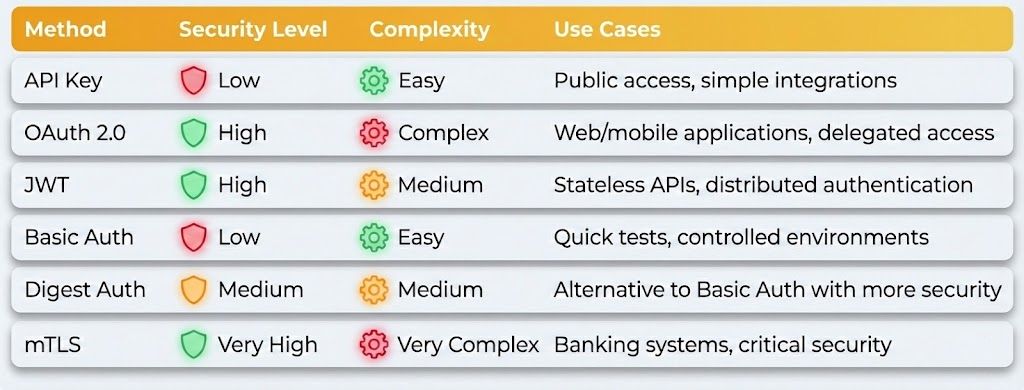
Which API Authentication Method Should You Choose?
Choosing the right type of API authentication depends on your security needs and infrastructure complexity. Here is a quick comparison:
Conclusion
For most modern cases, the recommended methods are OAuth 2.0 and JWT, as they offer security and flexibility without relying on static exposed keys.
Final Tip: If your API handles sensitive data, use robust methods like OAuth 2.0 or JWT in combination with HTTPS for enhanced security.
Which method do you prefer for your APIs? Let us know in the comments!